
DIUS Flasher Software for BRP ECU Programming | Firmware Recovery Tool
Professional firmware programming and ECU recovery software for BRP vehicles. DIUS Flasher allows restoring damaged ECUs, installing stock or tuning firmware, and recovering control modules after failed firmware updates
Manual content
Overview
DIUS Flasher is a professional ECU firmware programming and recovery software for BRP vehicles including Sea-Doo, Ski-Doo and Can-Am. Restore damaged ECUs, install firmware and upgrade engine performance.
 DIUS Flasher Software — Professional ECU Firmware Programming Tool for BRP Vehicles
DIUS Flasher is a professional software solution designed for restoring and replacing ECU firmware in modern BRP vehicles.
The program is primarily intended for advanced users, diagnostic specialists, and repair workshops working with Sea-Doo, Ski-Doo, Can-Am and other BRP equipment.
This software provides a safe and efficient way to recover or update firmware in engine control modules (ECM) without opening or physically modifying the ECU housing.
Main purpose of DIUS Flasher
DIUS Flasher allows technicians to:
-
Restore damaged or corrupted ECU firmware
-
Replace factory firmware with another standard or tuning firmware
-
Service ECM units installed in 4-TEC and E-TEC BRP vehicles
-
Perform recovery after unsuccessful firmware updates
The software works with popular ECU types such as:
-
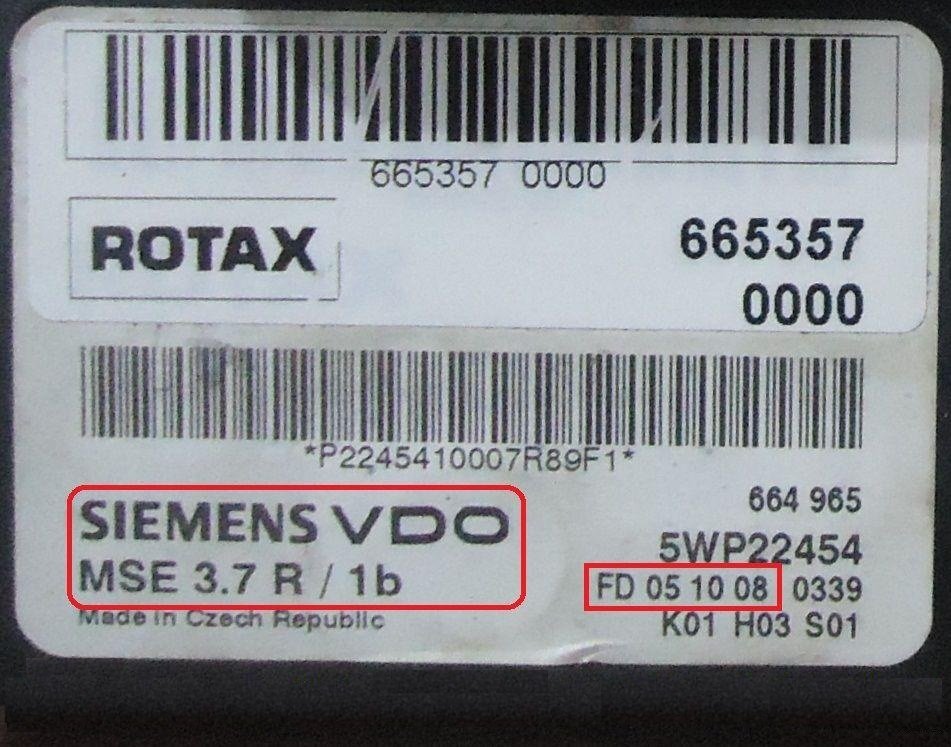
Siemens VDO MSE 3.7 (production years approximately 2004-2017)
-
BOSCH Motronic ME17.8.5
Important functionality
Using DIUS Flasher, users can perform firmware programming operations including:
-
ECU recovery after failed updates
-
Firmware replacement for performance tuning or restoration
-
Diagnostic preparation before reprogramming with OEM tools
However, the software does not allow direct editing of firmware parameters, such as fuel maps, RPM limits, or fuel pressure settings.
This ensures a controlled and safe workflow focused on firmware replacement rather than calibration editing.
Supported diagnostic interfaces
DIUS Flasher operates through professional diagnostic adapters connected to the vehicle’s diagnostic socket.
Supported interfaces include:
-
MPI-2 diagnostic interface
-
MPI-3 diagnostic interface
-
Original IXXAT CAN adapter
For stable operation, the software is designed for Windows-based diagnostic environments including legacy service computers used in workshops.
Software versions and licensing options
DIUS Flasher is available in multiple licensing configurations depending on workshop specialization and required functionality.
Typical license types include:
-
Repair licenses
Unlimited access to standard firmware within a selected vehicle category
(Sea-Doo, Ski-Doo, Can-Am ATV, SSV, Roadster Spyder, etc.) -
Tuner license
Allows replacement of standard firmware and limited use of tuning firmware
Includes bonus tuning firmware selections -
Single firmware purchase
Enables programming of one ECU using a specific firmware file -
Unlimited license
Provides unrestricted access to all standard and tuning firmware containers
with lifetime updates when new firmware is added to the database.
Practical use cases
ECU recovery after failed update
During official software updates performed through OEM diagnostic tools,
an interruption or error may cause the ECU to stop responding.
DIUS Flasher can be used to restore the original firmware, allowing the technician to safely repeat the update process afterwards.
Replacement of damaged ECM
In cases where the ECU firmware becomes corrupted due to electrical faults or improper programming,
the software helps restore the module functionality without requiring ECU disassembly.
Firmware database
A complete and constantly updated list of available firmware files is accessible directly inside the DIUS Flasher software interface.
This allows technicians to quickly locate the correct firmware version for the connected vehicle.
Why Do You Need DIUS Flasher Software?
Practical Examples of Real-World ECU Service Situations
DIUS Flasher software was developed to solve complex ECU firmware problems that cannot always be handled by standard diagnostic tools.
Below are several real-world service scenarios where this software becomes an essential professional solution.
Example 1 — Failed ECU Software Update
BRP periodically releases official software updates for their vehicles.
These updates are normally installed using the BUDS diagnostic software, which replaces the existing ECU firmware with a new version.
However, the update process does not always complete successfully.
Due to power interruption, communication errors, unstable diagnostic connection, or other technical issues, the ECU may stop responding during the update procedure.
In such situations:
-
The ECU becomes unusable
-
The vehicle cannot be operated
-
Standard diagnostic tools are no longer able to complete the update
If the ECU hardware itself is not physically damaged, DIUS Flasher 4.0 can restore the original firmware, allowing the technician to repeat the official update procedure safely.
Example 2 — Damaged or “Burned” ECU
Another common service case is ECU failure caused by electrical faults, incorrect programming, or internal hardware damage.
Typical symptoms include:
-
No ignition coil signal
-
No injector pulse
-
No fuel pump voltage
-
Complete engine start failure
-
Loss of ECU communication
In most cases, the only solution is ECU replacement.
Purchasing a brand-new ECU can be extremely expensive —
some BRP control modules cost over $1,000.
DIUS Flasher provides a cost-effective alternative.
A technician can purchase a working used ECU that matches the vehicle type (PWC, ATV, SSV, etc.), then program the correct firmware using the following workflow:
-
Install the replacement ECU in the vehicle
-
Connect the vehicle to a computer using an MPI-2 or MPI-3 interface and diagnostic cable
-
Launch DIUS Flasher 4
-
Select the required firmware
-
Confirm programming
Within approximately two minutes, the firmware is transferred to the ECU.
After programming:
-
Reset throttle position using BUDS
-
Clear diagnostic errors
-
Add DESS keys using the DESS Post interface
The vehicle is then ready for operation.
Example 3 — Performance Difference Explained by Firmware
Consider the engine specifications of the following Sea-Doo models:
-
GTI SE 130
-
GTI SE 155
Production years:
-
2008
-
2009
-
2010
All mechanical engine components are identical, including:
-
Same engine design
-
Same injectors (42 lb, part number 420874430)
The difference in engine power is determined entirely by firmware calibration.
For example:
-
Models rated at 130 HP use firmware version 420665357
-
Models rated at 155 HP use firmware version 420665783
By programming the firmware used in the 155 HP models into the ECU of a 130 HP vehicle, it is possible to obtain approximately 25 additional horsepower without mechanical engine modifications.
A similar principle applies to vehicles equipped with
BOSCH Motronic ME17.8.5 ECUs.
This demonstrates how firmware configuration directly influences engine performance characteristics.
Required Equipment
To use DIUS Flasher software, technicians must have:
-
MPI-2 or MPI-3 diagnostic interface
-
Diagnostic communication cable
-
Compatible Windows diagnostic workstation
Required hardware can be purchased together with DIUS Flasher licenses or separately.
ECU Compatibility Note
The Siemens VDO ECU used in personal watercraft (PWC) is considered the most universal version, as it contains the full set of electronic components.
Such ECUs can often be adapted for use in:
-
ATV
-
SSV
-
Ski-Doo
-
Roadster Spyder
Other ECU variants are usually limited to the vehicle types for which they were originally designed.
If there is any uncertainty regarding ECU selection, professional consultation is strongly recommended.
Summary
DIUS Flasher is a specialized professional tool for ECU firmware service in BRP vehicles.
It is widely used by workshops and experienced technicians who require:
-
reliable firmware recovery
-
structured firmware replacement workflow
-
support for multiple BRP vehicle platforms
-
scalable licensing options
The software significantly simplifies complex ECU service procedures and provides a practical alternative when standard diagnostic tools cannot complete firmware recovery tasks.
Start working with DIUS Flasher today
If you are involved in professional diagnostics, ECU repair or firmware service of BRP vehicles,
DIUS Flasher software provides a reliable and cost-effective solution for restoring and programming engine control modules.
Choose the licensing option and equipment that best matches your workshop needs.
You can:
• purchase a single firmware for occasional ECU recovery
• choose a repair license for unlimited access to stock firmware
• select a tuner license for performance firmware testing
• upgrade to an unlimited license for full access to all firmware containers
For stable and fast programming, we also recommend using professional diagnostic interfaces such as MPI-3.
Our specialists are always ready to help you choose the correct firmware, ECU type and licensing configuration.
Useful links
• View available DIUS Flasher licenses
• Browse firmware database
• Buy MPI-3 diagnostic interface
• Contact technical support