
BUDS License Key Installation Method 1 | BRP Diagnostic Software Activation Guide
This guide explains how to install and activate a BUDS license key using the MPI-2 or MPI-3 diagnostic interface. Follow this step-by-step method to correctly register your license and enable full diagnostic functionality for BRP vehicles including Sea-Doo, Ski-Doo and Can-Am models.
Manual content
Overview
The MPI-2 interface is widely used for connecting BRP vehicles to BUDS diagnostic software. Proper installation of the license key is required to unlock advanced service functions such as ECU diagnostics, module configuration, fault code reading and system calibration.
This manual describes the first installation method for activating a BUDS license. The procedure includes preparing the interface connection, launching the software, entering the activation key and verifying successful license registration.
Correct activation ensures stable communication between the vehicle control modules and diagnostic software. It also allows technicians and workshop specialists to perform maintenance, troubleshooting and software configuration safely.
This guide is intended for service centers, independent mechanics and advanced BRP vehicle owners who use MPI-2 adapters together with BUDS software.
!!! VERY IMPORTANT !!!
Each MPI adapter has a unique serial number.
The license key is based on the serial number of the MPI adapter and the current date.
Before you begin to install the license key check the date settings on your computer.
If the date on your computer will not match the actual date the program will tell that you are trying to install the wrong license or expired license.
The license key is valid for installation into the program within 24 hours only!
If this condition is met, then use Method 1 (normal).
If you have not installed a license key within the specified period, and the program displays a message that the license key has expired, we are recommend to use Method 2 .
If these instructions will not help you to solve the problem immediately contact the supplier of your license.
Method 1 (normal).
Description.
1. Connect the MPI-2 interface to your PC/laptop.
2. Launch B.U.D.S.. Page "Access privileges” will appear.
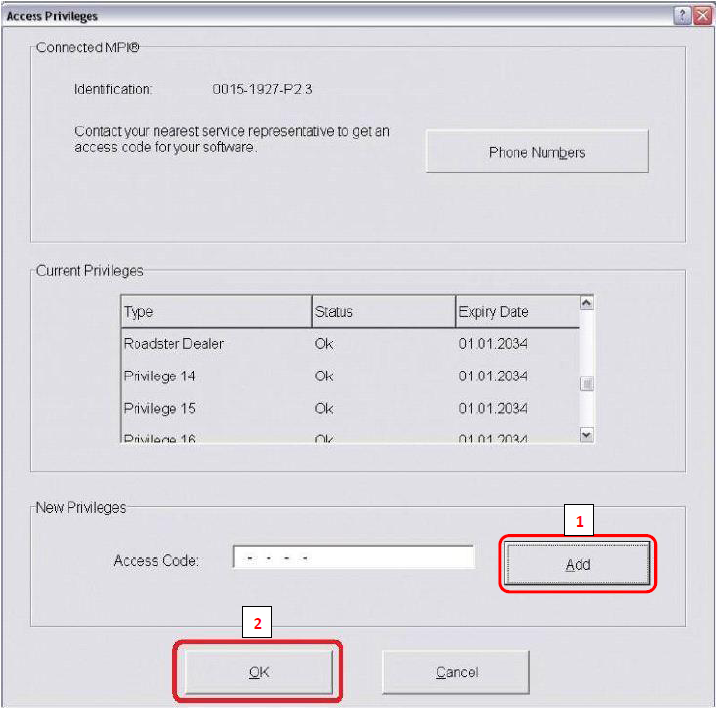
3. Insert your license key.
We suggest you "copy / paste” the license key to this section.
4. Once the keys have been inserted, click on Add, check the Expiry Date (!) and click on OK button.
You now have Full dealer B.U.D.S. diagnostic system!
If you have installed multiple versions of B.U.D.S., you must repeat steps 2-4 for each program.
One more license.
If a license is already installed and you want to install yet another type of license, do the following steps:
1. Connect the MPI-2 interface to your PC/laptop.
2. Launch B.U.D.S..
3. In the top menu, select MPI®. In the drop-down list, select Privileges... .
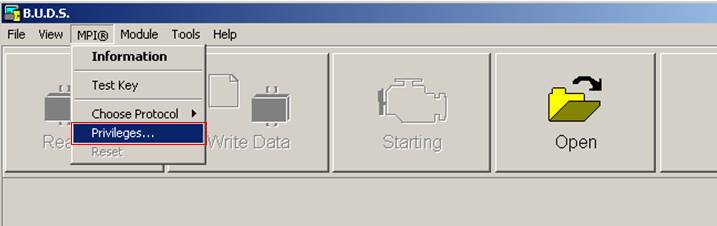
Page "Access privileges” will appear.
4. Insert your license key.
We suggest you "copy / paste” the license key to section Access Code.
5. Once the keys have been inserted, click on Add, check the Expiry Date (!) and click on OK button.
You now have Full dealer B.U.D.S. diagnostic system!
IMPORTANT NOTE !!!
If you have installed multiple versions of B.U.D.S., you must repeat steps 2-5 for each program.
We have discovered, on some screens the "OK" (red box highlighted above) is not visible at the bottom of the screen! This may be due to screen resolution or computer settings. But license cannot be installed until the "OK" button is clicked after entering the key code!
We have found that moving the task bar to a side position usually exposes the top of the button. But in extreme cases we have had to resort to changing the screen settings, by temporarily flip the screen to 90 degrees. This allows the button to be clicked!
Or:
After clicking "Add" button is necessary to press once the TAB key on your keyboard (TAB key is over CAPS LOCK) and press the ENTER key.