
New Temporary Option in BUDS2 to Reset/Clear Cluster as New
Learn how to reset and reprogram BRP digital clusters using the temporary BUDS reset function for MY21 and MY22 Ski-Doo, ATV, SSV and PWC models.
Manual content
Overview
This technical guide explains how to use the temporary "Reset Cluster as Service Part" function available in BUDS2 software for BRP vehicles.
The procedure applies to MY2021 and MY2022 units with delayed component campaigns where digital clusters were not properly reset before installation.
This manual includes:
- Cluster reset procedure in BUDS2
- ECM programming steps
- Cluster flashing process
- VIN and SKU mismatch correction
- Supported cluster compatibility information
- Recovery procedures for invalid cluster programming
The procedure supports Ski-Doo, ATV, SSV and PWC compact digital clusters.
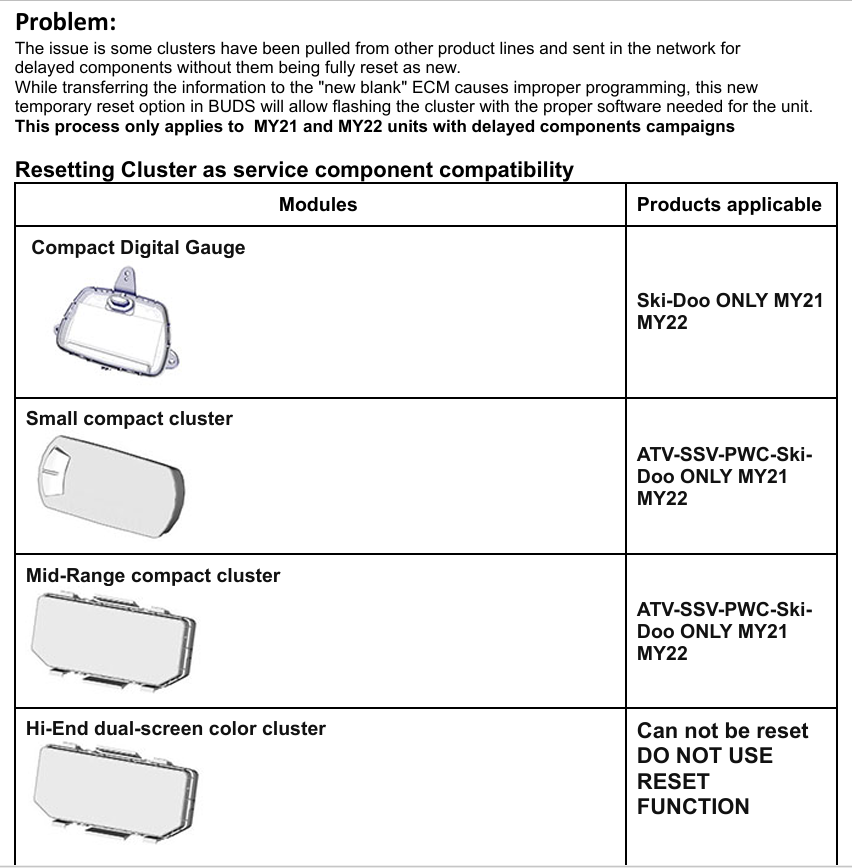
Temporary BUDS2 Function to Reset BRP Clusters as New
BRP introduced a temporary reset option in BUDS2 software that allows technicians to reset specific digital clusters as new service parts for MY2021 and MY2022 vehicles.
This function was designed to solve delayed component compatibility issues where clusters from different product lines were installed without being fully reset.
Supported Vehicles and Modules
The reset function supports:
- Ski-Doo MY21 and MY22 compact digital gauges
- ATV compact clusters
- SSV compact clusters
- PWC compact clusters
- Mid-range compact clusters
Important: Hi-End dual-screen color clusters cannot be reset using this procedure.
Important Notes Before Starting
- Always use the latest version of BUDS2 software.
- Connect the vehicle using a compatible MPI interface.
- Program the ECM first before flashing the cluster.
- The ECM must enter Boot Mode before programming.
- Confirm the correct SKU (model number) before continuing.
Step 1 — Program ECM
- Connect the vehicle to BUDS.
- Open Health Status.
- Select Program ECM.
- Program the ECM using the latest available configuration.
- Wait for the process to complete.
- Close the programming window.
- Rescan the vehicle.
After rescanning, a red lightning bolt icon will appear next to the cluster.
Step 2 — Reset Cluster as Service Part
- Open the Settings page.
- Select Reset Cluster as Service Part.
- Double click the function.
- Press Proceed.
- Wait for the reset process to complete.
- Close the window.
Step 3 — Flash the Cluster
- Rescan the unit.
- Select the Flash tab.
- Double click the current software update.
- Confirm the warning message.
- Start the download and flashing process.
- Wait until programming is completed.
VIN and SKU Mismatch Recovery
If the cluster is not in boot mode and the SKU is missing:
- Program ECM manually
- Enter the correct SKU
- Complete programming
- Rescan the vehicle
If the SKU is valid but incorrect for the vehicle:
- Reset Cluster as Service Part
- Rescan the unit
- Program ECM again
- Enter the correct SKU manually
- Flash the cluster
- Rewrite the model number
Important Warning
This temporary reset function should only be used for compatible MY2021 and MY2022 clusters affected by delayed component campaigns.
Need BUDS or BUDS2 Software?
DIAG-SYSTEMS supplies original BRP BUDS and BUDS2 diagnostic solutions including dealer licenses, MPI interfaces and technical support for workshops and professional users worldwide.